Starting the Tournament Console
If you are a returning player, you probably already have your copy
of the Tournament Games Console. You should see an icon on your desktop
that looks like:

Tournament
Games
Lost Password
If you have forgotton your password, enter your email address and
click "submit". We will send your password to your email.
I cannot find my Tournament Games
If you cannot find your Tournament Games icon on your
desktop, or you might have accidentally deleted your Icon, you may
determine that is is actually installed by going to "my computer" then to
your "c:" drive (or which ever is your default hard drive), and then to
your "program files" folder, then look for "tg games". Inside this folder,
you should see a file named "netconsole.exe". You can double click on this icon to start
Tournament Games, or "right-click drag" this onto your desktop, and choose
"create shortcut here" from the popup menu.
If you do not find any
of the files mentioned above or the "tg games" folder, just re-install the
console by following this
link. Be sure to choose "Open" to begin the installation. After the
installation is complete, an icon will be created for you on your desktop
and you will be asked if you would like to start the Tournament
Console.
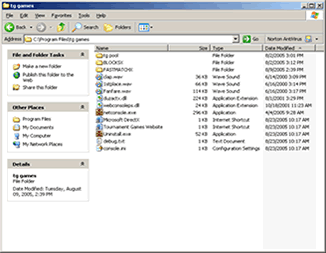
"tg games folder"
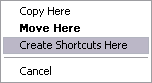
"create shortcut"