Tournament Games Login

Invalid username/password combination!
Lost your password?

Not a member yet? Sign Up!

Log in, or create an account to enjoy all of our premium tournaments! We offer free tournaments as well as prize tournaments in our web games, and in our downloadable games. Give them all a try, and let us know know which ones are your favorites!

Tournament Games - Classic Quality Games tournamentGames
quality games since 1997
  • JIM3 scored 3713 in SoliDroid (Android Version)
  • AAA105 scored 5429 in SoliDroid (Android Version)
  • JIM3 scored 5481 in SoliDroid (Android Version)
  • JIM3 scored 3700 in SoliDroid (Android Version)
  • JIM3 scored 4710 in SoliDroid (Android Version)
  • JIM3 scored 4147 in SoliDroid (Android Version)
  • JER2 scored 15390 in SoliDroid (Android Version)
  • JER2 scored 5099 in SoliDroid (Android Version)
  • JER2 scored 5502 in SoliDroid (Android Version)
  • KDB scored 12663 in SoliDroid (Android Version)

How to Play Solidroid Klondike Solitaire


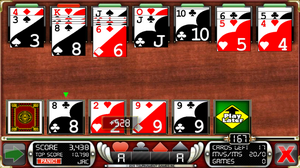
Solidroid Solitaire - Play this card game for free When playing SoliDroid, you will need to be efficient in every way. Practice, learn the rules and try to hone your skills. If on a mobile device, try using both hands to maximize your speed.
Once the game starts, study any possible moves that you have available. If you can, move any aces to the Ace Tray at the bottom. To move the cards, tap the one you want to move, then the column you want to move it to. If there are no playable cards in your SuperStax or PlayLater stacks, you can tap the deal tray on the lower left-hand corner to reveal your next card.
Move cards into the Aces Tray in ascending order. For example, if you have an Ace of Hearts, you would place it into the Ace Tray, then the Two of Hearts, etc. Move all cards into these columns to bust the deck!

Using the King Tray in the Solidroid Solitaire game

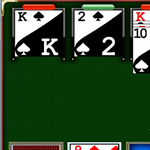
Above each of the King Trays on the top of the game, you will see a light that can be either gray, red, green, or yellow.
When you see:
Gray: There are no cards in the column.
Green: The cards in that column can be moved.
Red: A king is at the top of this column. No other moves should be made from this column.

Using the SuperStax in the Solidroid Solitaire game

When cards are dealt from the deck to play, they are dealt out to the SuperStax, in the order of whichever has the fewest amount of cards. A small arrow will be at the top of the SuperStax that will be getting the next card.

Using the Play Later in the Solidroid Solitaire game

Using this feature can change the whole outcome of your game. If you miss a move, move the last dealt card into an available PlayLater stack to complete the missed move. You can also begin moving cards to the PlayLater trays when you have reached the end of your deal cards, and are no longer able to make moves. This may possibly give you more play options, and extend your game.

Using the Wild Thang in the Solidroid Solitaire game

Playing this card takes careful planning, but don't take too long if you are using it as your last move. If you do, and the timer runs out, you will miss the chance to use it. However, you get points for not using it. You can play this card in place of any unplayed card in the game. Try to make the play in a place that will open you up for even more moves, enabling you to continue farther into the game!

Playing solveable decks in the Solidroid Solitaire game

This feature allows you to play a solveable solitaire deck. While you may not bust it 100% of the time, if you play your cards right, you can bust it. You still need to play as fast as you can, because the other players may bust the deck as well, and the competition will be tight!

Using the Redeal feature in the Solidroid Solitaire game

Some tournaments have the Re Deal feature available. For a few seconds at the beginning of the game, the Redeal will be displayed in the center of the screen. If you are not happy with the deal of the cards, press Re Deal to get a fresh set of cards.

Competing in Same Deck games in the Solidroid Solitaire

If a tournament you are playing is listed as Same Deck, then all the players entering that tournament will have the same deal of cards. Competition will be strong on these tournaments, so play as fast and smart as you can! If the tournament is listed as Diff Decks then it is possible that each deal given during that tournament is completely different.

Using the Panic feature in the Solidroid Solitaire game

Use the Panic button to gain extra time when you need it most. After pressing Panic, the timer will turn Yellow, and will continue running down but the game will not end, or a new card will not automatically deal. The next cycle of the timer will continue as normal.